How Long Does an HP HT03XL Battery Last? Tips to Maximize Battery Life
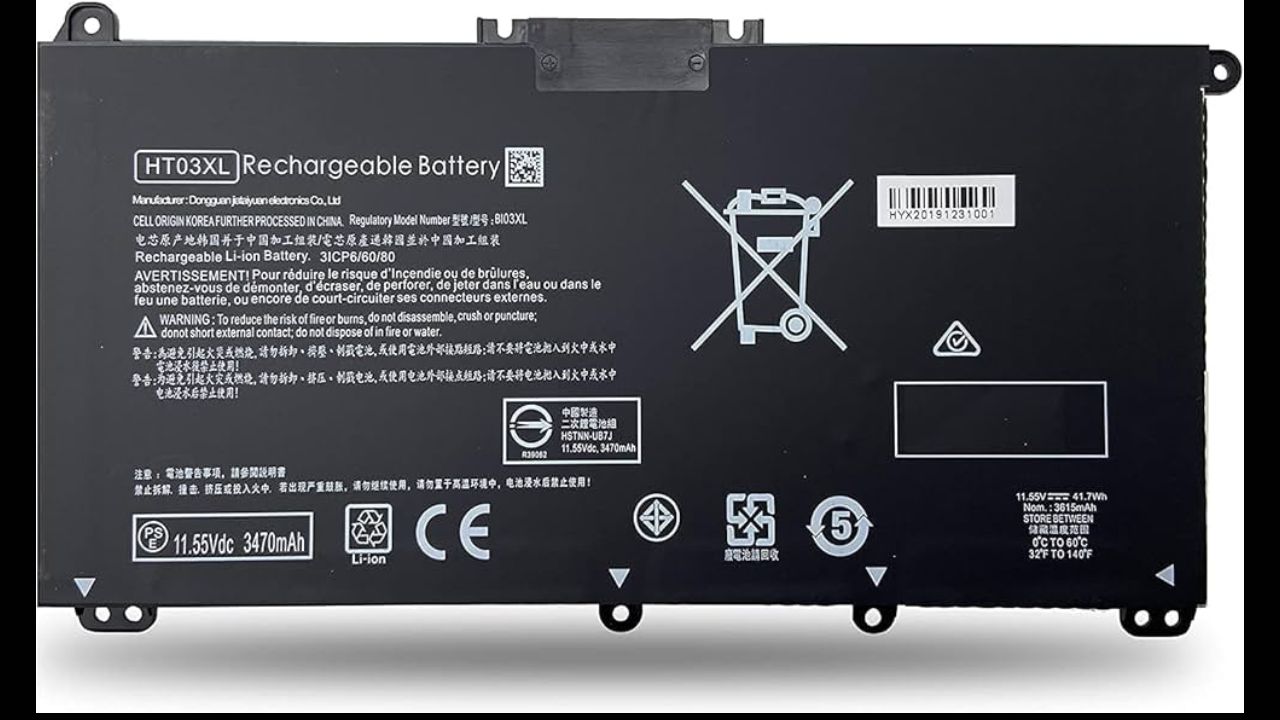
A common lithium-ion replacement battery for various HP Pavilion, Envy, and x360 laptop models is the HP HT03XL battery. It has been attributed to its performance-safety-cost balance. Having a normal capacity of approximately 3470 mAH or 41 Wh and a voltage of 11.34V, this battery is designed to conform to the requirements of OEMs and provide a dependable amount of power every day to work, study, and entertain. Knowledge of the duration of HP HT03XL and ways it can be made to last longer would enable the users to maximize their investment.
Average Battery Runtime Per Charge
An HP HT03XL battery can last four to seven hours, on a one-charge basis, depending on usage. Web browsing or document editing, or video streaming with moderate brightness would fall on the upside of this range. Heavier processes, such as graphic design, video editing, game-playing, or multi-tasking processes, can greatly decrease the runtime. The brightness of the display, background application, and Wi-Fi or Bluetooth are all factors that affect the rate at which the battery is depleted in daily use.
Overall Battery Lifespan in Years
In addition to the daily run time, the long life of an HP HT03XL battery is determined by charge cycles. An average battery has a capacity of about 500 to 700 full charge cycles, with a few high-quality models having a capacity of 800 under favorable conditions. To the vast majority of users, this would equate to two to four years of reliable usage. As time passes, battery capacity tends to reduce slowly, leading to a reduction in the time of using the battery between charges. This is not an error, but rather a natural feature of lithium-ion batteries.
Factors That Affect Battery Longevity
A number of factors will dictate the length of time an HP HT03XL battery will serve during its life. The charging habits are also a significant factor since charging to 100 percent regularly or charging every day may further promote wear. Another important factor is the operating temperature. Internal battery cells may be damaged by excessive heat that is usually generated due to clogged ventilation or excessive workloads. The behavior of software is also important, as applications that consume lots of power and old drivers may consume more energy than the user is aware of.
Charging Practices That Extend Battery Life
Battery degradation can be substantially reduced by proper charging. Keeping the battery charge moderate instead of fully depleting the cell on a regular basis is a way of preserving cell health. When charging with an original charger or a certified compatible charger, the voltage and current flow are stable, and the internal circuitry of the battery is not subjected to much stress. Full discharge and recharge patterns can assist in resetting the battery levels, but they should not be performed too often.
Optimizing Laptop Settings for Better Battery Health
The settings of the system have a significant influence on daily running and on the long-term battery life. Reducing the intensity of the screens to a comfortable level will decrease the use of power instantly. The operating system has power-saving features, which are useful in controlling CPU usage and background tasks. Maintaining the operating system and BIOS is also important since the laptop will be taking advantage of the most efficient power management capabilities that it can with the particular hardware configuration.
When to Replace the HP HT03XL Battery
However, with good care, all batteries finally come to the end of their useful life. Indications of replacement may include sudden shutdown or the inability to hold a charge, or rapid discharge. Replacement battery is certified and of high quality, which is why selecting a replacement battery that guarantees performance and safety. When used correctly and properly maintained, a new battery HP HT03XL may be reused to give years of efficient service.
Conclusion
The HP HT03XL battery is suited to provide reliable performance for daily use of laptops, and the correct usage of the battery has an average life of a few years. Although the daily run time can be affected by workload and the settings of the system, long-run durability is mostly affected by charging behaviors, temperature adjustments, and general maintenance of the laptop. By applying intelligent charging plans, adjusting the power settings, and taking proper care of the battery, it is not difficult to gain a considerable amount of time for the battery’s lifespan. After the battery starts losing its ability to sustain performance, one can replace it with a superior-quality compatible battery. It ensures that it can continue to work, be safe, and efficient. Sufficient maintenance is also beneficial in achieving the maximum battery life. This protects the overall health and performance of the laptop.